Project 04: Spöder
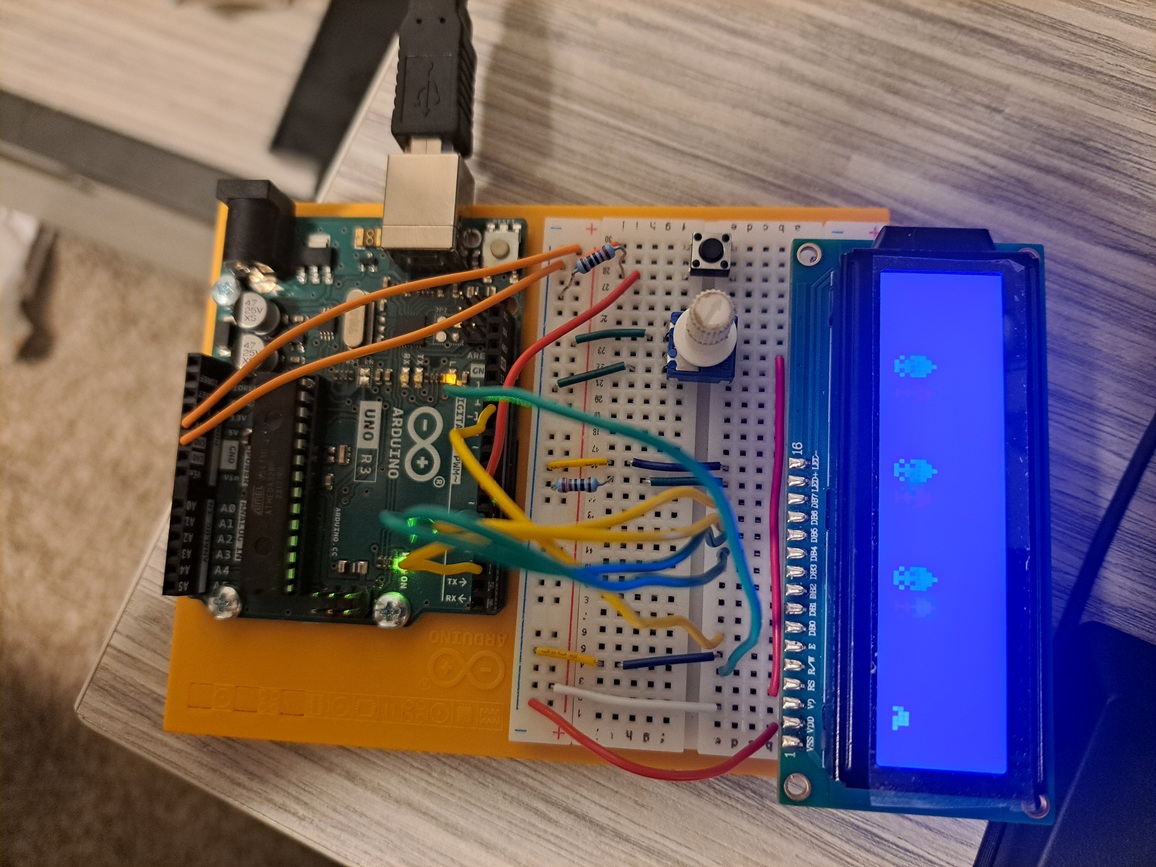
This project was kind of a mess, I had planned to make a custom split wireless keyboard since mine was falling apart. However, I took too long designing the PCB’s which meant that I wasn’t going to get my parts on time, so I had to come up with something new - I still plan on building it, and might make a post for it later. The new project I came up with was flappy bird style game on the Arduino and LCD.
The Circuit
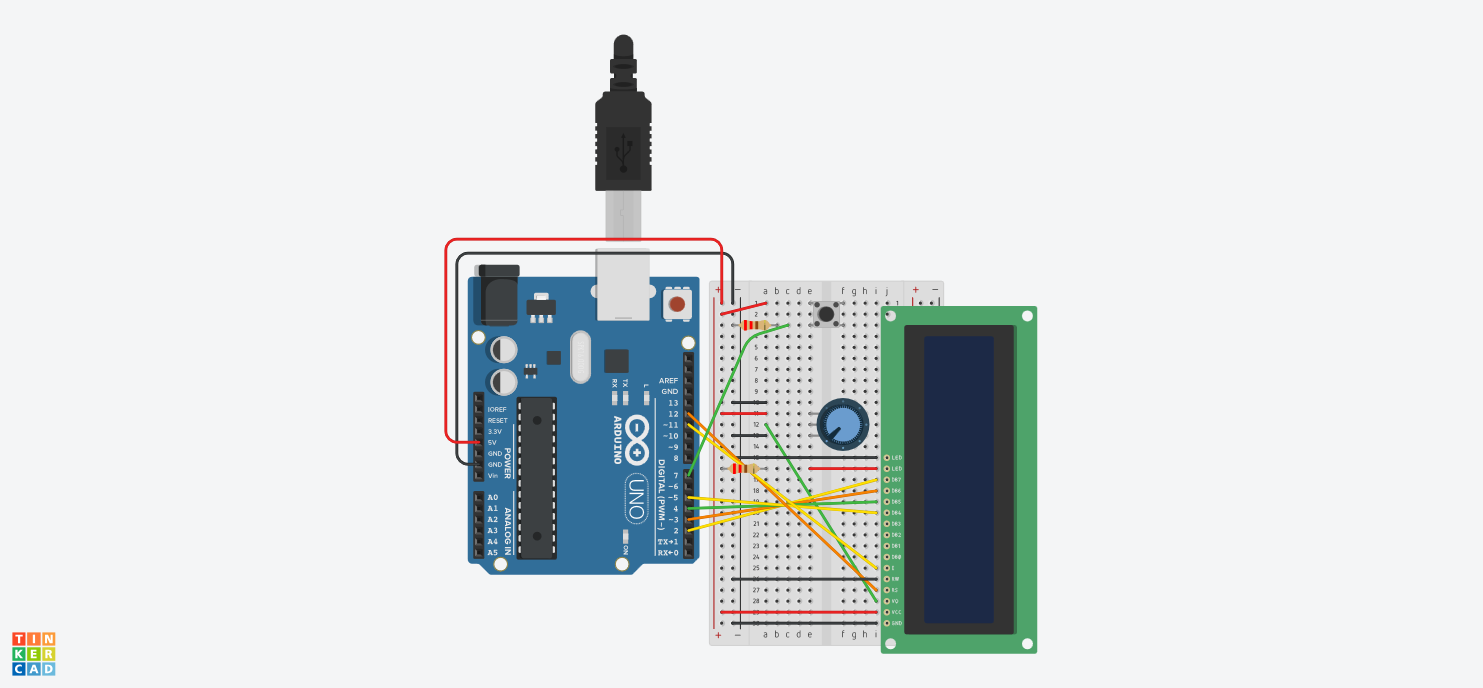
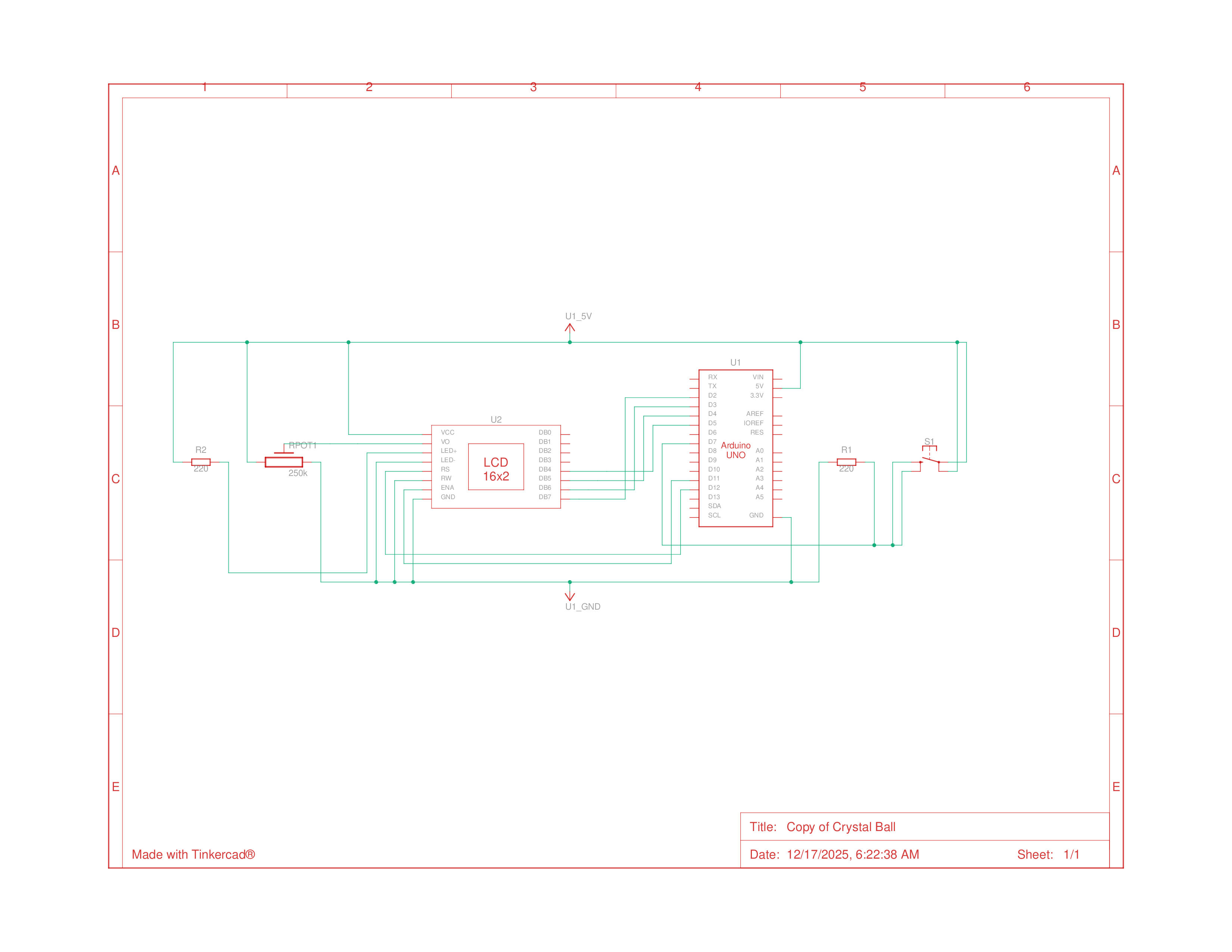
The circuit took a bit more wiring but it was pretty simple to put together, it was basically the Crystal ball project but with a button and 220Ω resistor instead of the tilt switch with the 10kΩ resistor
Parts List
| Name | Quantity | Component |
|---|---|---|
| U1 | 1 | Arduino Uno R3 |
| Rpot1 | 1 | 250 kΩ Potentiometer |
| U2 | 1 | LCD 16 x 2 |
| R2, R1 | 2 | 220 Ω Resistor |
| S1 | 1 | Pushbutton |
Schematics
Programming the Arduino
After constructing the circuit, I wrote the code for the Arduino. There was a lot more work for this part than my other projects since I needed to write the code to render graphics on the LCD.
Sprites & animation
I wanted to have an animated sprite for the main character and fancy spikes for the pipes. To do this I had to create custom characters and pass in byte arrays to represent each sprite, however, this was difficult to do by just writing in values as normal. Hence, I wrote a mini web tool to convert .png images into an array of bytes, where the transparent pixels were counted as the background. With this, I could make sprites in piskel, and then just paste their conversions into the Arduino IDE.
You can test it here:
PNG to Byte Array Converter
these are the sprites I created for it.
Then to animate the sprites, I just changed the character being drawn by the LCD in the loop, all the code is commented below
Code
1
2
3
4
5
6
7
8
9
10
11
12
13
14
15
16
17
18
19
20
21
22
23
24
25
26
27
28
29
30
31
32
33
34
35
36
37
38
39
40
41
42
43
44
45
46
47
48
49
50
51
52
53
54
55
56
57
58
59
60
61
62
63
64
65
66
67
68
69
70
71
72
73
74
75
76
77
78
79
80
81
82
83
84
85
86
87
88
89
90
91
92
93
94
95
96
97
98
99
100
101
102
103
104
105
106
107
108
109
110
111
112
113
114
115
116
117
118
119
120
121
122
123
124
125
126
127
128
129
130
131
132
133
134
135
136
137
138
139
140
141
142
143
144
145
146
147
148
149
150
151
152
153
154
155
156
157
158
159
160
161
162
163
164
165
166
167
168
169
170
171
172
173
174
175
176
177
178
179
180
181
182
183
184
185
186
187
188
189
190
191
192
193
194
195
196
197
198
199
200
201
202
203
204
205
206
207
208
209
210
211
212
213
214
215
216
217
218
219
220
221
222
223
224
225
226
227
228
229
230
231
232
233
234
235
236
237
238
239
240
241
242
243
244
245
246
247
248
249
250
251
252
253
254
255
256
257
258
259
260
261
262
263
264
265
266
267
268
269
270
271
272
273
274
275
276
277
278
279
280
281
282
283
284
285
286
287
288
289
290
291
292
293
294
295
296
297
298
299
300
301
302
303
304
305
306
307
308
309
310
311
312
313
314
315
316
317
318
319
320
321
322
323
#include <LiquidCrystal.h>

// Create lcd display
LiquidCrystal lcd(12, 11, 5, 4, 3, 2);

// Define the sprite struct for Spoder
struct Spoder {
  uint8_t row = 0;

  byte frame_1[8]{
    B10101,
    B11111,
    B01110,
    B00000,
    B00000,
    B00000,
    B00000,
    B00000,
  };

  byte frame_2[8]{
    B11101,
    B01111,
    B01110,
    B00000,
    B00000,
    B00000,
    B00000,
    B00000,
  };

  byte frame_3[8]{
    B11111,
    B11110,
    B01110,
    B00000,
    B00000,
    B00000,
    B00000,
    B00000,
  };

  byte frame_4[8]{
    B11001,
    B11111,
    B01110,
    B00000,
    B00000,
    B00000,
    B00000,
    B00000,
  };

  byte frame_5[8]{
    B00000,
    B00000,
    B00000,
    B00000,
    B00000,
    B01110,
    B11111,
    B10101,
  };

  byte frame_6[8]{
    B00000,
    B00000,
    B00000,
    B00000,
    B00000,
    B01110,
    B01111,
    B11101,
  };

  byte frame_7[8]{
    B00000,
    B00000,
    B00000,
    B00000,
    B00000,
    B01110,
    B11110,
    B11111,
  };

  byte frame_8[8]{
    B00000,
    B00000,
    B00000,
    B00000,
    B00000,
    B01110,
    B11111,
    B11001,
  };
};
// Define the Pipe frames
struct Pipe {
  byte frame_1[8]{
    B00100,
    B01110,
    B11111,
    B11111,
    B10101,
    B01110,
    B10101,
    B01110,
  };

  byte frame_2[8]{
    B01110,
    B10101,
    B01110,
    B10101,
    B11111,
    B11111,
    B01110,
    B00100,
  };
};

byte characterO[8] = {
  B00000,
  B01010,
  B00000,
  B01110,
  B10001,
  B10001,
  B10001,
  B01110,
};

// Input pin
constexpr int BUTTON_PIN = 7;
int _buttonState = 0;
int _prevButtonState = 0;

// Variables for the render loop
unsigned long _prevTimeMs = 0;
const long _frameTimeMs = 250;

// Game instances
int _gameState = 0;
Spoder spoder;
Pipe pipe;

// Current frame indices for animation
uint8_t currentSpoderFrame = 0;

// Pipe map for each column - 1 = bottom, 2 = top
uint8_t pipeMap[16];

// Spawn timing
const uint8_t PIPE_SPAWN_RATE = 4;  // frames between spawns
uint8_t pipeSpawnCounter = 0;

void spawnPipe() {
  // don't spawn if rightmost is not empty
  if (pipeMap[15] != 0) return;

  // Random gap position
  bool gap = random(0, 2);

  if (gap) {
    pipeMap[15] = 1;  // bottom pipe only
  } else {
    pipeMap[15] = 2;  // top pipe only
  }
}

// shift pipes to left
void scrollPipes() {
  for (int i = 0; i < 15; i++) {
    pipeMap[i] = pipeMap[i + 1];
  }
  pipeMap[15] = 0;
}


void drawPipes() {
  if (pipeMap[0] == (int)spoder.row + 1) {
    gameOver();
    return;
  }

  for (int col = 0; col < 16; col++) {
    if (pipeMap[col] == 1 || pipeMap[col] == 3) {
      lcd.setCursor(col, 0);  // bottom row
      lcd.write((byte)5);     // frame_1 (bottom pipe)
    }
    if (pipeMap[col] == 2 || pipeMap[col] == 3) {
      lcd.setCursor(col, 1);  // top row
      lcd.write((byte)4);     // frame_2 (top pipe)
    }
  }
}

void setup() {
  // Initialize the LCD
  lcd.begin(16, 2);

  // Initialize button input
  pinMode(BUTTON_PIN, INPUT);

  // Create custom characters for spoder frames (only once)
  lcd.createChar(0, spoder.frame_5);
  lcd.createChar(1, spoder.frame_6);
  lcd.createChar(2, spoder.frame_7);
  lcd.createChar(3, spoder.frame_8);
  lcd.createChar(4, pipe.frame_1);
  lcd.createChar(5, pipe.frame_2);
  lcd.createChar(6, characterO);

  openMenu();

  // Store the time of the last update
  _prevTimeMs = millis();
}

void flipSpoder() {
  static bool up = false;
  up = !up;

  // swap sprites stored in special characters since limited to 8 total
  if (up) {
    spoder.row = 0;
    lcd.createChar(0, spoder.frame_1);
    lcd.createChar(1, spoder.frame_2);
    lcd.createChar(2, spoder.frame_3);
    lcd.createChar(3, spoder.frame_4);
  } else {
    spoder.row = 1;
    lcd.createChar(0, spoder.frame_5);
    lcd.createChar(1, spoder.frame_6);
    lcd.createChar(2, spoder.frame_7);
    lcd.createChar(3, spoder.frame_8);
  }

  // check for collision with pipe
  if(pipeMap[0] == (int)spoder.row + 1)
    gameOver();
}

void loop() {
  // Get the current time
  unsigned long currentMillis = millis();

  // basic game state tracking
  switch (_gameState) {
    case 0:
      if (_buttonState == LOW && _buttonState != _prevButtonState)
        startGame();
      break;
    case 1:
      // check if enough time has passed for each frame for consistent fps
      if (currentMillis - _prevTimeMs >= _frameTimeMs) {
        _prevTimeMs = currentMillis;
        updateGame();
      }
      break;
    case 2:
      if (_buttonState == LOW && _buttonState != _prevButtonState)
        openMenu();
      break;
    default:
      return;
  }
  // Read the button state (you can use it for interaction)
  _prevButtonState = _buttonState;
  _buttonState = digitalRead(BUTTON_PIN);

  if (_buttonState != _prevButtonState && _gameState == 1)
    flipSpoder();
}

void updateGame() {
  lcd.clear();

  // Move pipes
  scrollPipes();

  // Spawn new pipes
  pipeSpawnCounter++;
  if (pipeSpawnCounter >= PIPE_SPAWN_RATE) {
    pipeSpawnCounter = 0;
    spawnPipe();
  }

  // Draw Spoder
  lcd.setCursor(0, spoder.row);
  lcd.write((byte)currentSpoderFrame);
  currentSpoderFrame = (currentSpoderFrame + 1) % 4;

  // Draw pipes
  drawPipes();
}

void openMenu() {
  // print title
  _gameState = 0;
  lcd.clear();
  lcd.print("  Sp");
  lcd.write((byte)6);
  lcd.print("der");
  lcd.setCursor(0, 1);
  lcd.print("    push btn");
}

void startGame() {
  _gameState = 1;
  flipSpoder();
}

void gameOver() {
  // print game over
  _gameState = 2;
  memset(pipeMap, 0, 16);
  lcd.clear();
  lcd.print(" Game Over");
  lcd.setCursor(0, 1);
  lcd.print("   push btn");
}
Challenges
Like my other projects, Time management was my biggest challenge, aside from figuring out how to render out sprites to the LCD.